
What Makes a Phone Ready for Digital SIM Technology
The Complete Guide to eSIM Compatible Devices and How They Work
Did you know most smartphones released after 2020 are actually eSIM compatible devices, meaning they have a tiny, embedded chip instead of a physical card slot. An eSIM works by letting you download a mobile plan directly onto your device through a simple QR code or app, so you never need to wait for a plastic SIM to arrive. This gives you the benefit of instantly switching between carriers or adding a second line for travel, all without fumbling with tiny trays.
What Makes a Phone Ready for Digital SIM Technology
A phone is ready for digital SIM technology when its hardware includes a dedicated eSIM chip, typically an embedded UICC (eUICC) soldered to the motherboard. This chip must be eSIM compatible and support remote provisioning, allowing a carrier profile to be downloaded wirelessly without a physical card. The device’s firmware must include the eSIM management interface within the operating system, enabling users to activate, switch, or delete profiles via a settings menu. The phone’s radio frequency bands and baseband firmware must be certified by the GSMA to handle the required OTA (over-the-air) commands securely. Only models explicitly listed by manufacturers as eSIM-ready—often newer flagships and mid-range devices—possess this combination of hardware and software prerequisites.
Key Hardware Requirements for Embedded SIM Support
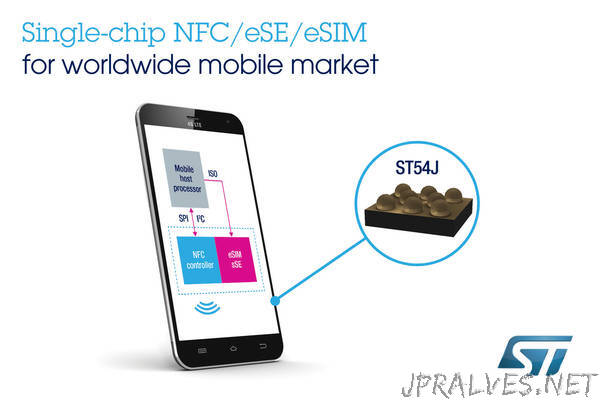
The foundational requirement is a secure element, a dedicated tamper-resistant chip that stores the eSIM profile and cryptographic keys, physically separate from the main processor and storage. This must be paired with an eUICC (embedded Universal Integrated Circuit Card) that complies with the GSMA’s Remote SIM Provisioning specification. On the radio side, the device needs an LTE/NR modem that supports the specific profile management commands for over-the-air provisioning. Embedded SIM support also mandates a certified radio firmware stack; the modem must handle the SM-DP+ (Subscription Manager Data Preparation) interface for secure profile download. A clear sequence for verifying hardware readiness includes:
- Confirm the device’s chipset includes a compliant eUICC or integrated secure element.
- Verify the modem firmware supports the ISIM (IP Multimedia Services Identity Module) application for 5G network authentication.
- Check that the baseband processor can manage multiple active profiles and handle the delete-and-install life cycle commands.
How to Check if Your Smartphone Has This Feature
To verify eSIM compatibility, first navigate to your device’s IMEI check tool, often found in Settings under “About Phone” or “General.” Dialing *#06# reveals your IMEI; compare it against your carrier’s online database for eSIM support. Alternatively, open Settings, search for “eSIM” or “Mobile Network,” and look for an “Add eSIM” or “SIM Management” option. If absent, your phone lacks hardware support. How do I confirm if my phone supports eSIM without contacting my carrier? Check the manufacturer’s official spec sheet online using your exact model number—look for “eSIM” under connectivity features.
Differences Between Physical SIM Cards and eSIM Integration
Physical SIM cards are a tiny plastic chip you physically insert into a tray, requiring you to swap them out when changing carriers. eSIM integration, however, is a permanent, soldered chip inside your phone that you activate digitally, so you never have to fiddle with a tray or risk losing a card. Switching mobile plans becomes instant with eSIM, as you download a new profile instead of waiting for a physical card to ship. With a physical SIM, you also carry the risk of damaging the card or tray, which an eSIM eliminates entirely.
Q: Can I use both a physical SIM and an eSIM at the same time?
Yes, many eSIM-compatible devices support dual SIM functionality, letting you run both simultaneously for separate work and personal lines.
Leading Smartphone Brands That Support Virtual SIMs
Leading smartphone brands now integrate eSIM support across their premium lineups. Apple’s iPhone models from the XS onward, including all US iPhone 14 and 15 variants, are fully eSIM-native, allowing users to activate cellular plans without a physical card. Google’s Pixel devices, from the Pixel 3a onwards, offer seamless dual-SIM functionality by pairing an eSIM with a physical nano-SIM. Samsung’s Galaxy S20 series and later flagships, including the Z Fold and Flip lines, support dual eSIMs in newer models, providing flexibility for frequent travelers. Motorola’s Edge series and the Razr foldables also include eSIM capability, though verification with carriers is recommended. For international roaming, prioritizing brands with native eSIM management tools simplifies carrier switching. However, not all carrier-locked devices grant operator-level eSIM activation rights, so verifying compatibility before purchase remains essential.
Apple’s iPhone Lineup and eSIM Capabilities
Apple’s iPhone lineup delivers a streamlined eSIM experience, starting with the iPhone XR, XS, and later models all supporting the technology. For users needing dual SIM functionality, the process is intuitive: you can activate a second line by scanning a carrier QR code or using a carrier app, with no physical nano-SIM required on U.S. iPhone 14 and newer models. To manage this, simply go to Cellular settings for eSIM activation, where you add or switch plans instantly. The sequence for setting up is clear:
- Go to Settings > Cellular.
- Tap “Add eSIM” and scan your carrier’s QR code.
- Label each plan (e.g., “Primary” or “Travel”).
This flexibility lets you toggle data usage between local and home networks effortlessly.
Samsung Galaxy Models with Dual SIM Functionality

Samsung’s Galaxy lineup makes juggling work and personal lines easy with dual SIM and eSIM support. Most flagships like the S24, S23, and Z Fold series let you use a physical SIM and an eSIM simultaneously, or two eSIMs in some newer models. You can assign different ringtones for each line or pick which SIM handles data for streaming without diving into settings each time. The S24 FE and A-series models sometimes limit eSIM to the secondary slot, so double-check your carrier’s compatibility. This flexibility means you keep your main number on a physical card while testing a travel eSIM on the fly.
Google Pixel Devices Built for Digital Profiles
Google Pixel phones are built from the ground up with digital profile management as a core feature, making eSIM setup feel seamless. You can store multiple profiles directly in the device’s settings, allowing effortless switching between a personal and work line without swapping physical cards. The integration is so deep that during initial setup, the phone prompts you to download an eSIM from your carrier right away. Plus, Pixel’s “SIM manager” lets you label each profile and choose which line handles calls or data, keeping your digital identities organized.
- Supports dual eSIMs plus a physical SIM for maximum flexibility
- Instant profile switching via the Quick Settings tile
- Built-in backup syncs your eSIM profiles with your Google account
- No extra software needed—profiles are managed in the native Settings app
Motorola and OnePlus Handsets with eSIM Options
For users exploring eSIM compatible devices, both Motorola and OnePlus offer several handsets that support virtual SIMs. Motorola’s Razr series, including the Razr 5G and Razr (2023), along with the Edge 30 and Edge 40 Pro, integrate eSIM alongside a physical nano-SIM. OnePlus models like the OnePlus 11, 12, and the OnePlus Open rely on dual-SIM functionality with eSIM for the second line. Users must verify carrier compatibility, as some models lock eSIM to specific networks. OnePlus 12 eSIM setup typically occurs directly through the phone’s network settings, while Motorola devices often require a carrier QR code. Can I use two eSIMs at once on a Motorola or OnePlus handset? No, both brands generally support only one active eSIM at a time, with the second slot reserved for a physical SIM.
Flagship vs. Mid-Range Models: Where eSIM Is Available
In the current device landscape, eSIM compatibility is overwhelmingly a flagship feature. Premium devices like the iPhone Pro series, Samsung Galaxy S Ultra, and Google Pixel Pro line almost universally include eSIM support. Mid-range models are increasingly adopting the technology, but adoption remains inconsistent. For example, while the Google Pixel 7a and Samsung Galaxy A54 include eSIM, brands like OnePlus and Motorola often reserve it for their higher-tier devices. Will a mid-range phone reliably support eSIM? Not always; you must check the specific regional variant, as manufacturers sometimes strip eSIM from budget-friendly models sold in certain markets. For practical use, if eSIM is critical—for travel or dual-line management—prioritize a recent flagship or, at minimum, a mid-range device from the same generation as its flagship counterpart.
Premium Devices with Native eSIM Support
Flagship models like the latest iPhones, Google Pixels, and Samsung Galaxy S series come with native eSIM support baked directly into the hardware, eliminating the need for a physical SIM tray entirely in many regions. These premium devices let you activate a cellular plan instantly by scanning a QR code or using a carrier app, making switching between travel and home lines seamless. You can store multiple eSIM profiles on one phone, swapping them on the fly without fumbling with tiny cards. This gives you dual-line flexibility—work and personal numbers, for example—without sacrificing water resistance or design integrity.
Premium devices with native eSIM support offer instant activation, multiple profile storage, and seamless carrier switching, all without a physical SIM slot.
Affordable Phones That Include This Feature
Among affordable models, eSIM support appears most consistently in mid-range Google Pixel “a” series devices, such as the Pixel 7a. These phones integrate the feature alongside a physical SIM slot, allowing dual-SIM use without sacrificing affordability. Some recent Motorola G-series variants, like the Moto G Power 5G, also include eSIM, though availability varies by carrier region. Samsung’s Galaxy A-series offers limited eSIM inclusion, typically reserved for the A54 and above. These models retain core functionality—calling, data, and switching profiles—without requiring a premium price, though users should verify carrier compatibility before purchase.
Older Generations That Received eSIM Support via Updates
Older generation flagships, such as the iPhone XS, XR, and later models, gained esim compatibility via updates, making them practical eSIM devices without requiring new hardware. For mid-range models, eSIM support arrived later for devices like the Google Pixel 3a and Samsung Galaxy A54 through firmware updates. The sequence for activating this feature typically follows:
- Ensure the device’s operating system is fully updated.
- Contact your carrier to obtain a new eSIM activation code.
- Navigate to Settings > Cellular/Mobile Data to add the eSIM
- Follow on-screen prompts to scan the QR or enter the code.
These updates transformed capable hardware into dual-SIM workhorses, bypassing the need for a physical second SIM.
Non-Phone Gadgets That Rely on Embedded SIMs
Smartwatches, fitness trackers, and standalone cellular tablets frequently use embedded SIMs for independent connectivity. These esim compatible devices allow users to make calls, stream music, or receive notifications without a paired smartphone. Laptops and some high-end digital cameras also leverage embedded SIMs for constant data access, enabling cloud backups or live location sharing. A critical nuance is that most gadgets require a specific carrier profile, limiting immediate network switching compared to phones. For travelers, an eSIM-equipped smartwatch can serve as a redundant communication hub, while a cellular tablet offers on-the-go productivity. The key advantage is the lack of a physical SIM tray, making these non-phone gadgets more water-resistant and compact.
Smartwatches with Cellular Connectivity and eSIM
Smartwatches with cellular connectivity and eSIM let you leave your phone behind entirely. You can take calls, stream music, and send messages directly from your wrist using the same phone number, thanks to the embedded eSIM. This makes them perfect for runners or quick errands where carrying a phone is a hassle. eSIM smartwatches typically auto-activate via your carrier’s app, avoiding the need for a physical SIM card slot. Battery life often takes a hit with constant cellular use, so charging becomes a slightly more frequent habit.
With an eSIM smartwatch, your wrist becomes an independent phone—just sync your plan, leave your phone at home, and stay connected.
Laptops and Tablets That Use Virtual SIMs
Laptops and tablets with virtual SIMs enable always-connected cellular data without a physical nano-SIM slot. Users activate a data plan directly through the device’s operating system, often via a built-in eSIM profile or a carrier’s app. This eliminates the need to insert or swap tiny cards when switching networks. For travel, you can download a local eSIM profile for that region while keeping your primary line inactive. Always-connected laptops like certain Microsoft Surface Pro models and iPad Pro tablets rely on embedded SIM technology to maintain LTE or 5G connectivity independently of Wi-Fi hotspots. Battery life and signal strength remain unaffected, as the virtual SIM is handled by the device’s dedicated modem.
Laptops and tablets that use virtual SIMs offer cellular connectivity without a physical card, allowing users to switch data plans via software and remain online anywhere, through integrated eSIM technology.
IoT Devices and Wearables with eSIM Integration
IoT devices and wearables with eSIM integration gain persistent cellular connectivity without a physical slot, enabling smaller, more rugged designs. Smartwatches can independently stream music, receive messages, and make calls away from a paired phone, while fitness trackers upload health data directly to the cloud over LTE-M or NB-IoT networks. Asset trackers use eSIMs to roam across operators for continuous location updates in logistics, and medical wearables transmit vitals to providers with reliable, low-power connections. The embedded profile can be switched remotely to a preferred network, ensuring seamless over-the-air provisioning for these compact gadgets without swapping cards.
Carrier Support and Compatibility Across Networks
When choosing an esim compatible device, carrier support varies widely by region. Even if a device is unlocked, you must check if your specific carrier offers eSIM provisioning. Major networks like T-Mobile and AT&T support most recent phones, but MVNOs often lag. Some carriers restrict eSIM activation to postpaid plans only, leaving prepaid users locked out. Additionally, not all international roaming partners support eSIM connectivity; a phone that works seamlessly in your home country might fail to connect abroad. Always verify with your carrier’s compatibility list before purchasing, as device model and firmware version can determine whether you get instant activation or get stuck with a physical SIM.
Which Providers Activate Digital SIM Profiles
Major global providers like Verizon, T-Mobile, and AT&T activate digital SIM profiles for eSIM compatible devices directly via their apps or QR codes. International carriers such as Vodafone, Orange, and Deutsche Telekom also support instant activation, often requiring device IMEI verification. MVNOs including Airalo and Holafly activate prepaid digital profiles exclusively for travelers. For compatibility, users must confirm their specific carrier offers eSIM activation for their device model, as not all providers support this feature across every device.
How to Switch Carriers Without a Physical SIM
To switch carriers without a physical SIM on an eSIM-compatible device, first ensure your phone is unlocked by your current provider. Then, access your new carrier’s eSIM activation portal, typically via their app or website. You will receive a QR code or activation code; scan or enter it in your device’s cellular settings under “Add Cellular Plan.” After downloading the profile, assign it as your primary or secondary line. The old carrier’s eSIM can then be removed from settings. This process allows instant carrier switching without waiting for a physical card.
Q: Can I switch carriers without a physical SIM if my phone is locked?
A: No. Your device must be carrier-unlocked before you can activate a new eSIM profile from a different provider. Contact your current carrier to request an unlock if needed.
Regional Differences in eSIM Adoption
Regional differences in eSIM adoption create fragmented compatibility for travelers with eSIM compatible devices. In North America and Europe, major carriers broadly support quick eSIM activation, making device setup seamless. Conversely, in parts of Asia and Africa, reliance on physical SIMs persists, requiring users to verify local carrier compatibility before travel. This uneven landscape means a device that works flawlessly in one region may require manual carrier verification in another, often forcing users to consult regional compatibility lists or purchase local SIMs upon arrival despite owning an eSIM-capable device.
Steps to Activate and Manage an eSIM Profile
To activate an eSIM on a compatible device, first ensure your smartphone or smartwatch is unlocked and supports eSIM. Navigate to the cellular or mobile data settings and select “Add Cellular Plan.” Scan the QR code provided by your carrier or manually enter the activation details. After activation, manage your eSIM by labeling each line (e.g., “Personal,” “Work”) to avoid confusion. You can designate a default line for calls, messages, and data, and toggle lines on or off individually.
Switching between eSIM profiles does not require a UK eSIM new physical SIM, enabling instant carrier changes.
To delete a profile, go to the same settings menu, tap the eSIM line, and choose “Remove Cellular Plan.”
Getting a QR Code or Activation Code from Your Carrier
To activate your eSIM on a compatible device, you must first obtain a QR code or activation code from your carrier. This code is typically delivered via email, the carrier’s app, or a secure web portal after you purchase an eSIM plan. Locating your eSIM activation code is a prerequisite; without it, a compatible phone cannot download the profile. Carefully scan the QR code during the device setup process, or manually enter the provided code if the scan fails. Some carriers limit codes to a single activation attempt, so confirm your device is ready before initiating.
Q: Can I get a new QR code if I lose the original one from my carrier?
A: Yes, most carriers allow you to regenerate a new activation code through your online account or customer support, though some may require a fee for repeated requests.
Adding a Digital Line Through Device Settings
To add a digital line through device settings, navigate to the Mobile Network or Cellular menu, then select “Add eSIM” or “Download a new line.” Your device will prompt you to scan a QR code provided by your carrier or enter confirmation details manually. Following activation, the new profile appears instantly under your network list, where you can assign it to a primary or secondary slot for dual SIM usage. This process bypasses physical SIM trays entirely, letting you switch carriers without swapping cards.
- Access “Add eSIM” directly from Settings > Cellular/Mobile Data.
- Use the device camera to scan the carrier’s activation QR code.
- Label each digital line (e.g., “Work” or “Travel”) for easy management.
Switching Between Multiple eSIM Plans
Switching between multiple eSIM plans on your device is super straightforward once you’ve got them installed. Just dive into your Settings app, tap on Cellular or Mobile Data, and you’ll see your saved profiles listed there. To use a different plan, simply tap its name and enable it as your active line—your device will automatically disconnect the previous one. This lets you juggle a domestic plan and a local travel eSIM without swapping physical cards. For quick changes, many phones let you set a default for calls while routing data separately. Managing your active eSIM profile this way makes adapting to different coverage needs a breeze.
Common Issues and Troubleshooting for eSIM Devices
You just got an eSIM-compatible device, but activating it feels like a puzzle. The most common issue is the eSIM activation failure, often caused by a poor internet connection during the download. Ensure you are on a stable Wi-Fi network, not mobile data, as the eSIM profile needs a solid link to install. Another frequent headache is the “No Service” error after setup; this usually means the eSIM profile isn’t selected as your primary line. Go into your device’s cellular settings and manually choose it for data and calls. If you see a “NR Not Allowed” (Non-Standalone not permitted) message, your device may be on a region-locked firmware that blocks certain eSIM bands. A factory reset often clears software conflicts, but only do this as a last resort—back up your eSIM profile QR code first to avoid eSIM deletion errors. Physical SIM removal while an eSIM is active can also cause carrier profile mismatches, so remove the pSIM before adding the eSIM for a clean handshake.
Activation Failures and How to Resolve Them
Activation failures often stem from an unstable internet connection during the eSIM profile download, or from scanning a corrupted QR code. To resolve this, first ensure you are on a strong Wi-Fi network. Restarting the device can clear software glitches that block activation. If the QR code fails, manually enter the SM-DP+ address and activation code provided by your carrier. For persistent errors, remove the eSIM profile entirely and re-add it. A carrier-provisioned “network unlock” is frequently required for locked devices. Troubleshooting eSIM activation systematically isolates whether the issue lies with connectivity, the profile data, or device eligibility.

Limited Dual SIM Use on Certain Models
Limited Dual SIM use on certain eSIM-compatible models occurs when hardware restrictions prevent simultaneous activation of both a physical SIM and an eSIM line. For instance, some devices allow only one eSIM profile to be active alongside a physical SIM, while others support dual eSIMs but block voice and data concurrently across both networks. This limitation typically stems from modem firmware partitioning, not carrier policy. A practical example: a phone may show both SIMs registered but automatically suspend data on one during a call. Users must check the device’s slot configuration, as some models physically disable one tray when an eSIM is activated, reducing to single-active mode.
Factory Resets and eSIM Backup Strategies
A factory reset on an eSIM-compatible device will erase the embedded profile unless it is a permanently locked carrier eSIM. To prevent losing access, always use the device’s settings menu to export a QR code or activation code before resetting. Many devices also support eSIM backup strategies like storing the profile in a cloud account or transferring it to a secondary phone via Bluetooth. Without these steps, you may need to contact the carrier for a new download, which can involve fees or delays. Proactive profile backup ensures uninterrupted service after a system restore.
Future Trends in Device Connectivity Beyond Physical Cards
The future of device connectivity for eSIM compatible devices points toward seamless, multi-network agility, where switching carriers happens directly from a settings menu. Devices will increasingly act as neutral hubs, supporting several active profiles for work and personal lines without swapping hardware. A key advancement is on-demand bandwidth boosting, where your device automatically negotiates temporary access to the fastest local network for streaming or gaming. This era eliminates physical card slots entirely, enabling thinner, more waterproof hardware that syncs subscriptions across your laptop, watch, and car. Profile management becomes intuitive, allowing you to transfer a digital identity instantly to a new phone or activate a local data plan mid-flight without a store visit.
Upcoming Smartphones Expected to Adopt eSIM
Upcoming smartphones expected to adopt eSIM will prioritize embedded SIM provisioning for faster carrier switching without a physical tray. Models like the rumored Pixel 10 and Galaxy S26 series will likely offer dual eSIM slots, enabling simultaneous work and personal lines. Users should expect seamless eSIM transfer tools baked into the OS, eliminating the need for QR codes or manual APN configuration. The removal of SIM trays in these devices frees internal space for larger batteries or enhanced cooling systems.

- Require an active internet connection for initial eSIM activation during setup
- Support at least two eSIM profiles stored on-device with one active at a time
- Will include secure element chips to store eSIM data offline
How Automotive and Home Devices Are Embracing This Tech
Automotive and home devices are integrating eSIM technology to enable always-on connectivity independent of a user’s smartphone. In vehicles, eSIMs allow embedded systems to stream real-time traffic, over-the-air firmware updates, and diagnostics without pairing a phone. Home appliances like smart thermostats and security cameras now use eSIMs to maintain a direct cellular link, bypassing unstable home Wi-Fi. This creates a seamless ecosystem where a car’s infotainment adjusts settings based on the driver’s home device data. Embedded connectivity for automotive and home devices ensures these systems remain functional even when personal mobile networks fail. Q: How are eSIMs changing automotive and home device usage? A: They allow vehicles and appliances to operate as independent network nodes, enabling persistent cloud access for upgrades and automation without secondary device dependency.
The Move Toward eSIM-Only Designs
The move toward eSIM-only designs fundamentally reshapes how you interact with your device. Without a physical slot, the entire chassis becomes more robust against dust and water, and internal space is freed for larger batteries or advanced cooling systems. Activating a plan becomes a purely digital process, typically via a QR code or carrier app, eliminating the wait for a mailed SIM. Switching carriers or adding a second line happens instantly through your settings menu, requiring no tool to eject a tray. This streamlined approach means your device is always ready to adapt to your connectivity needs without hardware swaps.
| Benefit | Practical Impact |
| Durability | No slot means fewer entry points for water or debris |
| Space | Frees internal volume for larger batteries or thermal management |
| Activation | Instant digital setup without waiting for physical mail |
| Switching | Change carriers from your device settings in seconds |
What Defines a Device That Works with an Embedded SIM
Key Hardware Requirements for eSIM Support
Differences Between eSIM-Only and Dual-SIM Models
How to Check If Your Current Phone Has an eSIM Slot
Quick Steps to Verify eSIM Compatibility in Settings
Using IMEI Numbers to Confirm eSIM Readiness
Top Smartphone Brands Offering eSIM Capability
Apple Models with eSIM Features from iPhone XR Onward
Samsung Galaxy Devices That Support Dual eSIM and Physical SIM
Which Tablets and Laptops Include an Embedded SIM Module
iPad Models with Cellular eSIM for On-the-Go Connectivity
Windows Laptops and Chromebooks with Integrated eSIM Hardware
What to Look for When Choosing an eSIM-Compatible Device
Understanding Carrier Compatibility Across Different Regions
Battery and Performance Trade-Offs in eSIM-Enabled Gadgets
Common Issues Users Face with eSIM Hardware and How to Fix Them
Managing Multiple eSIM Profiles on One Device
Troubleshooting eSIM Activation Errors and Network Drops
